Creative Live! Cam HD for beginners
Creative Live! Cam is a webcam for beginners. It has several functions and extra facilities at an acceptable price.The Creative Webcam includes an integrated microphone. The connection is via USB. According to manufacturers, there are no problems with the installation. This makes it possible for you to start immediately. Creative created a compact and well-engineered entry-level device with easy handling. The product is accompanied by comprehensive operating instructions in various languages.
Simple and oval design
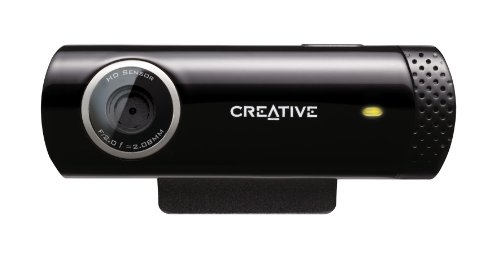
Creative Live! Appears modern and simple and is oval-shaped in length. The lens was aligned flush with the manufacturer and the integrated microphone is located on the right side. The model comes in a shimmering black.A yellow LED light completes the compact design.
Size, width and weight
With a weight of 200 grams, the device weighs only slightly more than conventional webcams. Creative Live! Cam is 4.5 cm wide and 2.2 cm high. A one and a half meter long cable provides enough flexibility for installation. The bracket consists of a hinge lever that allows you to change the angle of the camera. This provides up-and-down tendencies to capture the user perfectly.
Simply-held technology - sufficient for beginners
Creative uses a 1.0 megapixel HD sensor, which provides the webcam with a HD-ready resolution of 1280 x 720 pixels. With an image rate of 30 frames per second, the videos for video conferencing appear quite sufficient.Thanks to the HD image sensor, the webcam adapts to changing light conditions. The device achieves a smooth, uninterrupted face tracking and guarantees a pixel-free and beautifully observable result. A 5.7-megapixel camera provides sharp images with optimal conditions. With the extensive software, you can customize the images to share them instantly on social networks.
Clear voices in voice chats
Thanks to the noise reduction software included in the cam, the integrated microphone responds relatively well to ambient noise. It filters out them successfully from the background and highlights your own voice. This ensures clear voices in voice chats and overall creates a very pleasant conversation with the other.
Installation and set-up
After connecting the camera via a USB 2.0 input of the computer, the webcam is ready for use without pre-installation. To use the full scope of the camera, you will find a free software on the Creative website. This includes special user-friendly extras, such as a video and photo recording tool. It also includes automatic face-lightening settings and various Softskin features. At the same time, a child safety lock is installed to protect against unauthorized access. Also, the program expands the computer with a facial recognition software that promises more security than written passwords.
Small extras to the cheap webcam
The camera has a one-hit button that triggers a snapshot button for photos and easily starts and stops video recording. With the Live Contact feature it is possible to directly call up an online contact list of the Windows Live Messenger. A built-in small LED light turns on for five seconds when the webcam is started. When shooting video, the LED lights up permanently in a rich shade of yellow.
The manufacturers Creative are two-year warranty on the product. The webcam also offers comfortable operation by connecting to social networks. This allows the user to place his video, image and sound recordings immediately on the Internet.
System requirement for immediate use
Creative recommends at least an Intel Pentium 4 processor with 2.4 GHz with a working memory of 512 MB RAM.The webcam supports Windows systems as of Windows XP Service Pack 2 and Mac OS X 10.5. Another advantage is the compatibility with Linux kernel 2.6. In order to install all drivers and extras completely, Creative Live! Cam 500 MB free disk space. One disadvantage is, however, against all non-Windows users. The software available for download only runs under Windows operating systems.