What you should know about the Canon CanoScan 5600F Scanner
Many people want to watch old slides not only on a projector and they have in some other form. Here a scanner out of the question, which slides digitized like the Canon Scan. The 5600F scanner does exactly this possible because the slides can be scanned quickly and cleanly. Depending on the desired the slides processed, print or save the connection. Also documents, movies or photos can be digitized and printed next slides. Regarding handling and speed sets the 5600F new standards and for this reason, a closer look is very useful.
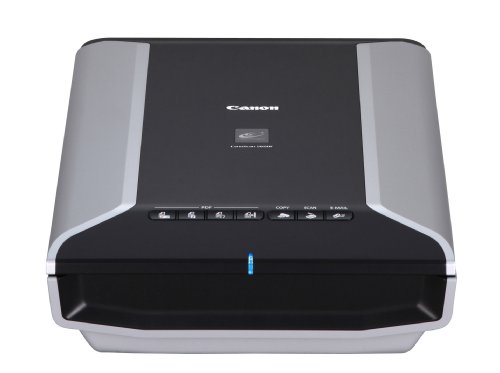
The Canon scanner has a weight of 4.3 kilograms and the dimensions are 49.1 times 27.2 times 9.7 centimeters.The maximum resolution of the device is 4,800 times 9,600 dpi and the color depth is 48 bit. To the scope of supply includes the film holder, the EWS warranty card, Quick Start Guide, USB cable, the scanner and the software power of 19 watts. The Sanner is produced in the colors black / silver and optically it can leave a high quality and robust impression. In the housing a power supply is integrated. On the housing surface of the scanner is operated with 7 keys and overall it is designed compact and handy. Very easy to install the driver software and the main operating instructions available at the supplied manual. The service is, however, self-explanatory and in standard applications can be dispensed more help.
Thanks to an integrated LED light, no Vorwärmephase is required and therefore, the device is ready for immediate use. The Canon scanner works overall very effective. With 300 dpi Din-A4 pages are scanned within eleven seconds and at the slides can even 4 are fed at once. With different formats and photos can be placed in the scanning surface simultaneously on the computer they are still as displayed as individual files. A post-processing is particularly in the older photos or slides often necessary and with the integrated post-processing program called MP Navigator EX 2.0 this can be done easily.
The peculiarities of the CanoScan 5600F
This is a CCD scanner for KB-slides or -Filmstreifen with Durlichteinheit. The maximum resolution of 4800 times 9600 dpi is very high and in just eleven seconds 300-dpi scans are delivered. Without heating Aufsihtsvorlagen can be thanks to the LED light source scanned. The powerful CCD scanner is suitable for documents, movies and photos. There are 7 EZ buttons Auto Scan mode, a USB port and the built-in power adapter.
The scanning resolution and the functions
With the high resolution of the high-performance scanners can provide exceptionally brilliant scans and hence there is a precise color reproduction and crisp detail. 48 bit as color depth ensures accurate color reproduction and with every scan, the images can be thus reproduced as faithfully as possible. In outstanding quality small film strips / -Dias be scanned. Directly on the Mac or PC, the KB-films can be scanned. With the Transparency Unit, it is possible that up to six shots or four framed slides Survey scans are made possible by KB-film strips. At the high speed is the fact that a super bright white LED is used in the scanning and this for reflective originals. Every user can start directly with the scanning, because there is no pre-heating.
The operation, connectivity and software
In the sophisticated scanner 560F, there are numerous functions for convenient operation. On the front there is the comfortable scanning buttons and a button can such important tasks. With the tasks include scanning, scan to PDF, scan to email and copy. For their own needs the keys the user can also configure itself also. Another convenient feature is the auto-scan mode. The type of original is detected in the scanner, the settings are automatically adjusted and the scan data is saved in the appropriate format. Clicking this can all be activated via the software menu. The connectivity options of the Canon scanner for fast data transmission provides a high-speed USB interface and the productivity is thus increased. For the power supply required for the integrated network adapter provides. A number of software products are supplied to the scanner and so ArcSoft PhotoStudio, ScanGear and MP Navigator EX.
The flatbed scanner
The Canon Scan 5600F, in a test absolutely points. When scanning the color space very confident. represented Very good bright and brilliant colors as well as a dark black. Even the smallest details are captured accurately by the high resolution. In a text of the 5600F is almost unchallenged and all his strength he plays only triggered at photos. The hardware, which is very well supported by the scanning software. The scanner turns out to be powerful all-rounder and slides, filmstrips, documents and photos, the device is convincing with its excellent color depth and excellent scan quality. Overall, all scans post a faithful impression. The software provides automatic correction and many scans then offer a better quality as the original. The use is particularly convenient by eliminating the preheating time.
The 5600F is a time-saving work is absolutely possible. The purchase of the Canon scanner is interesting for different users. Each user can configure his or her needs and preferences themselves. Scan-to-PDF or scan-to-e-mail is not a problem. Also saving the files on the desktop or simple copying can be easily accomplished. For automatic document recognition, there is the Auto Scan Mode. the device can be used power saving to a PC via USB. The comprehensive software package is an added bonus in the scanner. There are in the unit of parameter settings available for color tones, contrast or brightness.
Conclusion
It concerns with the Canon 5600F is a high quality all-rounder, which is suitable for an office or for private use. Convince, the device with the high user comfort, the impressive color depth and with excellent scanning results. The images are reproduced more sharply with the scan quality. In order to focus, nothing is lost, the documents, however, must rest directly on theglass surface. Who wants a very satisfactory result in slides, which they should skim advance. Many features such as Scan to PDF, scan to email or copy to be fulfilled and thus texts without difficulty can be edited, there is also a text recognition program.



 It concerns with the Canon 5600F is a high quality all-rounder, which is suitable for an office or for private use. Convince, the device with the high user comfort, the impressive color depth and with excellent scanning results. The images are reproduced more sharply with the scan quality. In order to focus, nothing is lost, the documents, however, must rest directly on theglass
 surface. Who wants a very satisfactory result in slides, which they should skim advance. Many features such as Scan to PDF, scan to email or copy to be fulfilled and thus texts without difficulty can be edited, there is also a text recognition program.